
There is no shortage of articles promising the “best AI marketing tools.”
This isn't another one.
I've worked in digital business and marketing for more than two decades, and today I manage multiple online projects spanning content websites, affiliate marketing, WordPress, education and other digital ventures.
That has made me increasingly selective about software.
I don't need another AI tool because it generated some buzz on X or appeared on a “50 tools you need” list.
A tool needs to do at least one of four things:
- save meaningful time;
- help me make better decisions;
- automate work I shouldn't be doing manually; or
- help me create something meaningfully better.
My approach to AI has also changed.
I no longer ask:
“What is the best AI tool?”
I ask:
“What job should this tool perform in my workflow?”
That distinction matters because I don't believe one AI platform should do everything.
ChatGPT has one role. Claude has another. Perplexity solves a different problem. Make connects systems. WordPress publishes. ZimmWriter helps with content production. Other tools handle research, distribution, visitor intelligence or affiliate-link management.
Together, they form a practical operating stack.
Here are the AI and marketing tools I currently use—and, more importantly, what I use each one for.
Disclosure: Some links on Illumarket are affiliate links. If you purchase through one of these links, Illumarket may earn a commission at no additional cost to you. An affiliate relationship does not determine which tools I include or what I say about them.
1. ChatGPT: My Primary AI Thinking Layer
ChatGPT is probably the AI tool I interact with most frequently.
But I don't primarily think of it as an AI writer.
I use it much more as a thinking, analysis and problem-solving layer across my online businesses.
Typical uses include:
- researching business ideas;
- evaluating opportunities;
- developing SEO strategies;
- creating content briefs;
- analyzing data;
- improving existing content;
- troubleshooting WordPress issues;
- developing automation logic;
- comparing alternatives;
- structuring projects; and
- turning rough ideas into actionable plans.
The biggest benefit isn't that ChatGPT can produce text quickly.
It is that it can shorten the distance between an idea and something I can actually implement.
For example, a new project may require decisions about positioning, website architecture, data structure, SEO, automation and monetization.
Traditionally, I might have approached each of those separately.
AI makes it easier to work through the entire system while seeing how one decision affects another.
That's considerably more valuable to me than using AI simply to generate another 2,000-word article.
Where ChatGPT fits
I generally use ChatGPT near the beginning and middle of a workflow.
It helps me think, challenge ideas, analyze information and work through implementation.
Then other tools take over specific parts of the process.
That distinction is central to my stack:
AI helps me think. Specialized tools help me execute.
2. Claude: My Second AI Workbench
I don't rely on a single generative AI platform.
Claude, developed by Anthropic, gives me another AI environment for working through substantial pieces of content, documents, ideas and projects.
The value of having both Claude and ChatGPT isn't simply redundancy.
Different AI systems can approach the same problem differently.
When something matters, getting a second analytical perspective can be useful.
I may develop an idea in one AI system and then use another to:
- challenge the assumptions;
- restructure the material;
- review a longer document;
- explore an alternative approach;
- improve an explanation; or
- spot something I may have overlooked.
Claude's project-oriented workflow is also useful when I want to keep related source material and instructions together rather than repeatedly rebuilding context.
Claude vs. ChatGPT?
I don't find the question “Which is better?” particularly useful.
Both platforms continue to evolve rapidly.
For me, the better question is:
Which one is better suited to what I'm doing right now?
Sometimes that's ChatGPT.
Sometimes it's Claude.
And sometimes I'll deliberately use both.
That is how I think AI should increasingly be used: not as a loyalty contest between models, but as a collection of capable tools available for different types of work.
3. Perplexity: Research and Source Discovery
Perplexity plays a different role.
I primarily use it for current research and source discovery.
If I'm investigating a market, company, tool, trend or unfamiliar subject, I often want to move quickly from a question to relevant source material.
Perplexity is particularly useful for that kind of exploratory work because its research-oriented searches provide source links alongside generated answers.
But there is an important distinction:
I don't treat the AI-generated answer as the source.
I use it as a route to the source.
A typical workflow looks more like:
Ask → discover sources → open the important sources → verify → analyze
That verification step matters.
AI search dramatically accelerates research, but faster research shouldn't mean weaker research.
For consequential business, editorial or SEO decisions, I still want to understand where a claim originated.
Where Perplexity fits
I use Perplexity for things such as:
- researching current developments;
- finding source material;
- exploring unfamiliar markets;
- researching products and companies;
- comparing claims;
- discovering relevant reports or publications; and
- getting oriented before conducting deeper analysis.
This creates a useful division of labour in my AI stack:
Perplexity helps me find information.
ChatGPT and Claude help me work with it.
I make the final judgment.
4. Make.com: My Automation Layer
If ChatGPT and Claude help with thinking, Make.com (Official Site ↗) increasingly acts as the connection layer between systems.
Make is a visual automation platform that allows different applications, data sources and AI systems to work together.
This is where AI starts becoming particularly interesting for a one-person business.
A large amount of online-business work consists of tiny repetitive tasks.
Individually, they might take only a few minutes.
Collectively, they can consume hours.
A workflow might look something like:
New information → process it → classify it → update a database → update WordPress → send an alert if human attention is required
Once workflows start operating this way, automation becomes much more than “send an email when someone fills out a form.”
It becomes infrastructure.
I am particularly interested in using Make for:
- WordPress workflows;
- structured data;
- affiliate information;
- content operations;
- notifications;
- AI processing;
- database synchronization; and
- marketing automation.
What I don't automate
There is an important limit.
Automation should remove repetitive work, not remove judgment.
If a decision involves editorial interpretation, an important business choice or something where accuracy matters, I generally want a human review step.
My preferred model is:
Automate the predictable. Review the consequential.
5. WordPress: Still the Publishing Foundation
WordPress isn't the newest tool in this article.
It may be one of the most important.
I've worked with WordPress for years and manage numerous websites built around it.
That experience has actually made me less interested in adding unnecessary complexity.
Every plugin, theme, API, script and third-party service becomes another dependency.
My WordPress philosophy today is increasingly:
Keep the front end useful. Keep the underlying data structured. Keep unnecessary complexity under control.
AI makes this approach even more important.
The traditional publishing model was:
Write article → publish article
The emerging model is much more interesting.
One structured piece of information could potentially feed:
- an article;
- a comparison;
- a dynamic table;
- a deal box;
- an AI assistant;
- an email;
- a social post;
- an automated alert; and
- an external application.
WordPress can remain the publishing layer while structured data and automation increasingly operate behind it.
That is where I think the platform becomes particularly valuable in the AI era.
6. Pickaxe: Building AI Experiences Without Starting From Scratch
Pickaxe (Official Site ↗) occupies another part of my stack.
Instead of simply using AI myself, Pickaxe lets me think about how AI can be turned into an experience for someone else.
I've been exploring that in the context of digital-marketing education.
Rather than placing a generic chatbot beside a lesson, an AI assistant can potentially help a learner:
- ask questions;
- test understanding;
- explore examples;
- work through exercises; or
- apply a concept to a real situation.
That is much more interesting to me than adding AI simply because a website “needs a chatbot.”
The opportunity is to build purpose-specific AI tools.
Examples might include:
- a learning assistant;
- a guided marketing exercise;
- an SEO diagnostic tool;
- a research assistant;
- a business decision aid; or
- an interactive knowledge resource.
The underlying language model matters.
But so do the instructions, context, interface, workflow and expertise surrounding it.
That's an area I'll continue experimenting with on Illumarket.
7. ZimmWriter: Content Production Without Surrendering Content Strategy
ZimmWriter is part of my content-production workflow.
But it doesn't decide what Illumarket publishes.
That's deliberate.
One of the easiest ways to misuse generative AI is:
collect keywords → generate hundreds of articles → publish everything
Technically, that's efficient.
Editorially, I think it's backwards.
More pages do not automatically create more expertise, authority or value.
My preferred workflow is closer to:
Topic selection → research → original angle → content brief → AI-assisted production → human improvement → fact-checking → publish
ZimmWriter can dramatically accelerate the production portion.
But the part that makes an article worth publishing needs to come from somewhere else.
On Illumarket, I want that additional value to include things such as:
- something I've actually tested;
- screenshots;
- a real workflow;
- original observations;
- data;
- a business experiment;
- a mistake;
- a decision framework;
- results;
- or a practical implementation.
I call that the Illumarket Original.
Every substantial article should contain one.
Why I won't use ZimmWriter as an autoblog
The objective isn't to see how many AI-generated pages I can publish.
The objective is to use AI to reduce the cost of producing material that was worth publishing in the first place.
That's a very different strategy.
8. PaperGuide: Working With Research Material
General-purpose AI and research-focused AI solve different problems.
PaperGuide (Official Site ↗) sits on the research side of my toolkit.
This category becomes useful when I'm dealing with source documents, academic material or information that needs to be examined systematically rather than simply discussed conversationally.
Potential uses include:
- reviewing research papers;
- organizing source material;
- preparing educational content;
- summarizing documents;
- creating research notes; and
- developing evidence-based content.
The caveat is important.
An AI-generated summary isn't automatically evidence.
If a claim matters, I still want to trace it back to the underlying source.
AI should help me navigate information more efficiently.
It shouldn't make provenance irrelevant.
9. VisitorTracking: Understanding What Visitors Actually Do
Publishing content is one thing.
Understanding what happens after someone arrives is another.
VisitorTracking (Official Site ↗) gives me another layer of website intelligence beyond simply knowing that a page received a certain number of visits.
It can help examine visitor sessions, traffic sources, pages viewed, funnels and conversions across websites.
That leads to much more useful questions:
- Where do visitors arrive?
- Which pages do they view next?
- How long do they stay?
- Which traffic sources produce meaningful behavior?
- Where do visitors abandon a funnel?
- Which pages actually contribute to conversions?
- Are changes improving results?
This is where website analytics becomes useful operationally.
A page ranking in Google isn't necessarily successful.
A page attracting thousands of visitors isn't necessarily successful either.
Success depends on what I wanted that traffic to accomplish.
Where VisitorTracking fits
I think of VisitorTracking as my visitor-behavior and conversion-intelligence layer.
Content and SEO bring visitors in.
VisitorTracking helps me better understand what happens afterward.
That information can then feed back into content, UX and marketing decisions.
The important loop is:
publish → measure → understand → improve
Not:
publish → count pageviews → publish more
10. Hopper HQ: Social Distribution
Creating a useful piece of content doesn't mean anyone will see it.
Distribution matters.
Hopper HQ (Official Site ↗) helps handle part of the social-media publishing and scheduling process.
This becomes increasingly valuable when one person manages multiple projects and multiple social accounts.
The objective isn't to automatically blast the same message everywhere.
A better approach is to take one substantive piece of work and adapt it appropriately.
For example:
Original article
↓
LinkedIn insight
↓
X post or thread
↓
Instagram visual
↓
short educational post
↓
follow-up discussion
AI can help with the transformation.
A scheduling platform can reduce the administrative burden of distribution.
But neither can compensate for an original idea that wasn't worth sharing.
That's another recurring principle in my stack:
Automate distribution, not originality.
11. Pretty Links: Simple Affiliate-Link Infrastructure
Not every useful marketing tool needs AI.
Pretty Links (Official Site ↗) is a good example.
Affiliate links change.
Merchants change tracking platforms.
Offers change.
The same destination may appear on multiple pages across a website.
Putting raw merchant URLs everywhere creates an unnecessary maintenance problem.
A controlled redirect structure lets me use a cleaner URL such as:
example.com/go/product
If the destination changes, the redirect can be updated centrally rather than editing every article containing the old affiliate link.
It's not glamorous.
It solves a real problem.
And that illustrates another important principle:
Don't use AI where a simple, mature tool already solves the problem well.
My AI & Marketing Stack at a Glance
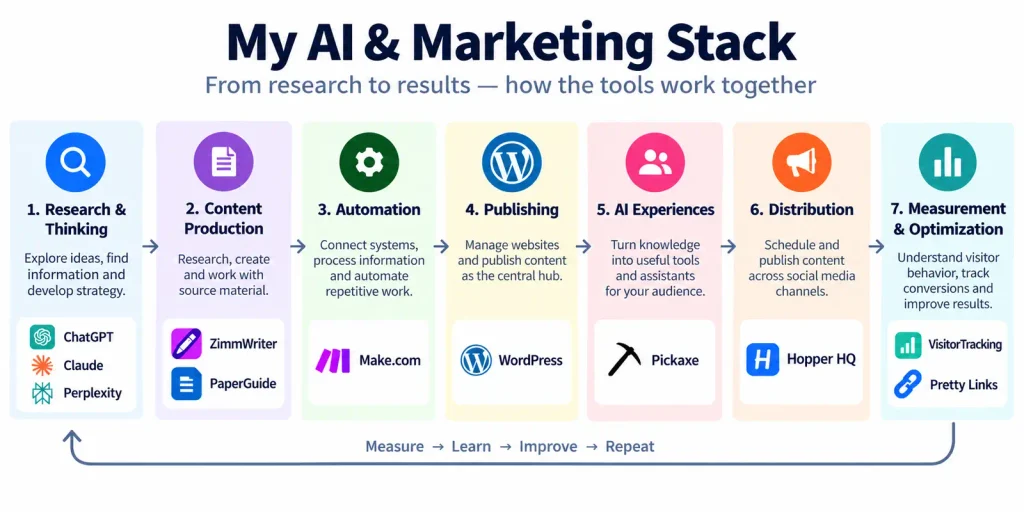
Here is the simplest way to understand how the pieces fit together:
| Tool | Primary role in my workflow |
|---|---|
| ChatGPT | Thinking, analysis and problem-solving |
| Claude | Second AI workbench and substantial document/content work |
| Perplexity | Current research and source discovery |
| Make.com (Official Site ↗) | Automation and system orchestration |
| WordPress | Website and publishing infrastructure |
| Pickaxe | Building user-facing AI tools and assistants |
| ZimmWriter | AI-assisted content production |
| PaperGuide | Research and source-material workflows |
| VisitorTracking | Visitor behavior, funnels and conversions |
| Hopper HQ | Social-media distribution |
| Pretty Links | Affiliate-link management |
The important word here is role.
I don't need every tool to do everything.
In fact, I would rather not have them do everything.
Giving each platform a clear job makes the overall system easier to understand and manage.
From AI Tools to AI Systems
This is probably the biggest change in how I think about AI.
Individual applications matter less than they did at the beginning of the generative-AI boom.
Systems matter more.
Imagine this workflow:
- New information is collected.
- An AI system analyzes or classifies it.
- Structured data is updated.
- WordPress displays the new information.
- A significant change triggers a notification.
- A person reviews anything requiring judgment.
- Content based on the information can be distributed through appropriate channels.
- Visitor behavior shows whether the result is actually useful.
Now we're no longer talking about an AI writing tool.
We're talking about a small digital-business operating system.
That's the direction I find much more interesting.
What I Deliberately Don't Automate
As these tools become more capable, it becomes tempting to automate everything.
I don't think that's the right objective.
There are things I don't want AI doing autonomously.
I don't want AI:
- manufacturing first-hand experience;
- deciding that an unverified claim is true;
- publishing hundreds of pages because keywords exist;
- pretending I've tested something I haven't;
- replacing important editorial judgment; or
- making consequential business decisions without appropriate review.
The more capable automation becomes, the more important it is to decide where humans remain involved.
My current principle is simple:
Automate repetition. Accelerate research. Assist creation. Preserve judgment.
The Smallest Stack That Gets the Job Done
I own and test more software than appears in this article.
That isn't necessarily an advantage.
One of the risks of the current AI boom is accumulating dozens of subscriptions that perform variations of the same job.
The objective isn't to build the world's largest AI stack.
I want the smallest practical collection of tools that reliably gets the work done.
That means tools will enter this list.
Others will leave.
Some may become redundant as larger AI platforms add functionality.
That's fine.
This isn't intended to be a permanent ranking of software.
It's a snapshot of the operating system I'm actually using and developing in 2026.
What I'll Be Testing Next
Illumarket will increasingly document how these tools are used in actual workflows.
That includes experiments involving:
- AI-assisted content systems;
- Make.com automations;
- WordPress workflows;
- AI-powered learning tools;
- structured affiliate data;
- website visitor analysis;
- SEO in the AI-search era;
- live commercial data;
- content repurposing;
- research workflows; and
- digital-business automation.
Some experiments will work.
Some won't.
Both are useful.
Because the purpose of Illumarket isn't to tell you that every new AI product is revolutionary.
It's to figure out which tools and systems actually make digital work better—and which ones don't deserve a place in the stack.
Next: Explore the individual tools and practical workflows behind the Illumarket stack as I test, build and document them.

Karim Bennouna is the founder of Illumarket and an experienced digital marketer and entrepreneur based in Victoria, British Columbia. With more than two decades of experience across digital marketing, business technology, and finance, he focuses on practical applications of AI, automation, SEO, and data. Karim holds a PhD in Business from Queensland University of Technology.